Enable Shift Tracking Only When One Max Limit and Cash Drawer Are Configured
Stay is enhanced to allow users to enable the shift tracking only when at least one max limit is configured, and the cash drawer configuration is active.
Feature Setting
The Enhanced Cashier Activity feature setting must be enabled to use this feature.
Permissions
The following existing permissions must be assigned to users:
-
Stay_AccessCashierSetup1
-
Stay_AccessCashierSetup2
When the Enhanced Cashier Activity feature setting is enabled, by default, the Shift Tracking flag will be disabled. This flag will remain greyed out and can be enabled by users only when there is one active shift limit and the cash drawer configuration is available. The following message is displayed as a banner in the General Configuration section: To enable shift tracking, minimum one Max start shift and cash drawer configuration must be active.
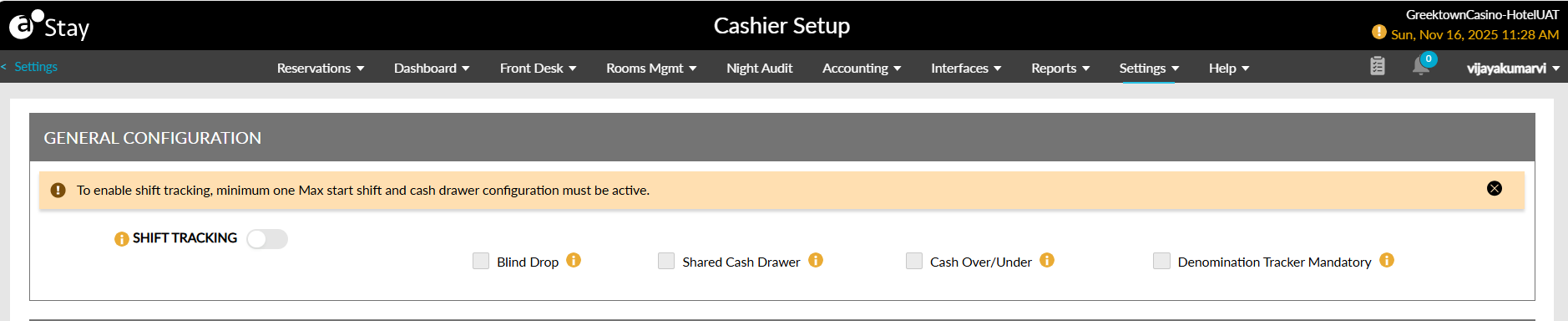
The Shift Tracking flag will be disabled after the date roll when the user tries to disable the final active shift limit or cash drawer. Upon deactivation, the Confirmation pop-up screen will be displayed that shows the following message: Deactivating the Final Active Configuration Will Disable the Shift Tracking, Do You Want To Proceed? When users click Yes to confirm, the changes are saved and applied after the completion of date roll.